

Take a look at this code. How would you upgrade it to the latest PHP version?
What do you notice?
Anything missing?
What’s deprecated?
How would you upgrade this code?
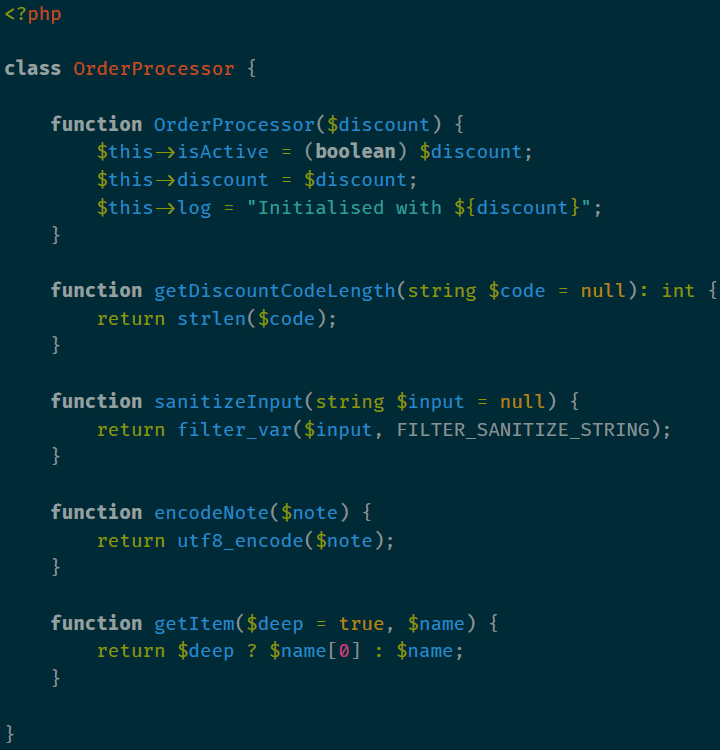
How would you do that over 200 files?
For each of your 10 projects?
Now how would you do that for a whole codebase?
What about across multiple codebases?

Find and replace?
Not flexible enough.
Too static. Doesn’t work with code structures.
Comby?
You have to specify all the rules yourself.
It’s better than find and replace, but it’s too manual.
A self-hosted tool like Microplane?
You have to specify all the rules yourself.
No project-specific awareness.
Maintenance burden.
Remember Microplane? This issue has been going on for so long that we’d already built and sunsetted something to tackle it!
That was based on Comby. Which means it has the same problem: too manual.
Also, what if the code structures are written differently across projects? What about dealing with different conventions/styles?
And of course, the maintenance burden. Curse of the internal project.
BUT WAIT - something else is happening…
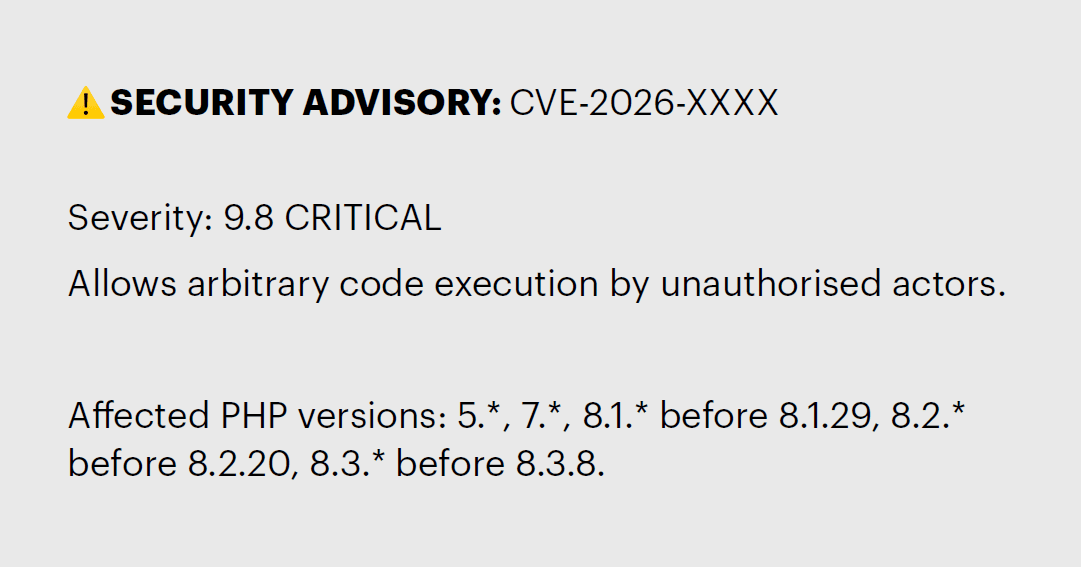
Now it’s urgent and unavoidable.
Uh oh, a new security vulnerability. Critical. Our apps are now wide open. Attackers from all corners of the globe.
The only solution: upgrade PHP versions. So now the refactor is urgent and unavoidable.
Can you refactor and test an entire codebase under this kind of pressure? Do you want to?
Introducing Rector
What is Rector?
• Static analysis and automated refactoring tool.
• Applies transformation rules (“rectors”) to your codebase.
• Runs locally, quickly.
• Free & Open Source (FOSS) with MIT licence.
It refactors your code for you.
It’s rule-based, each rule having a single responsibility.
It’s rule-based, each rule having a single responsibility.

1. Install Rector composer

Rector is a dev dependency. Don’t deploy it!
3. Run Rector

Run it!
Rector also has a config wizard if you omit “process”. Check the docs for more info. Link at the end.
Rector upgrades your code
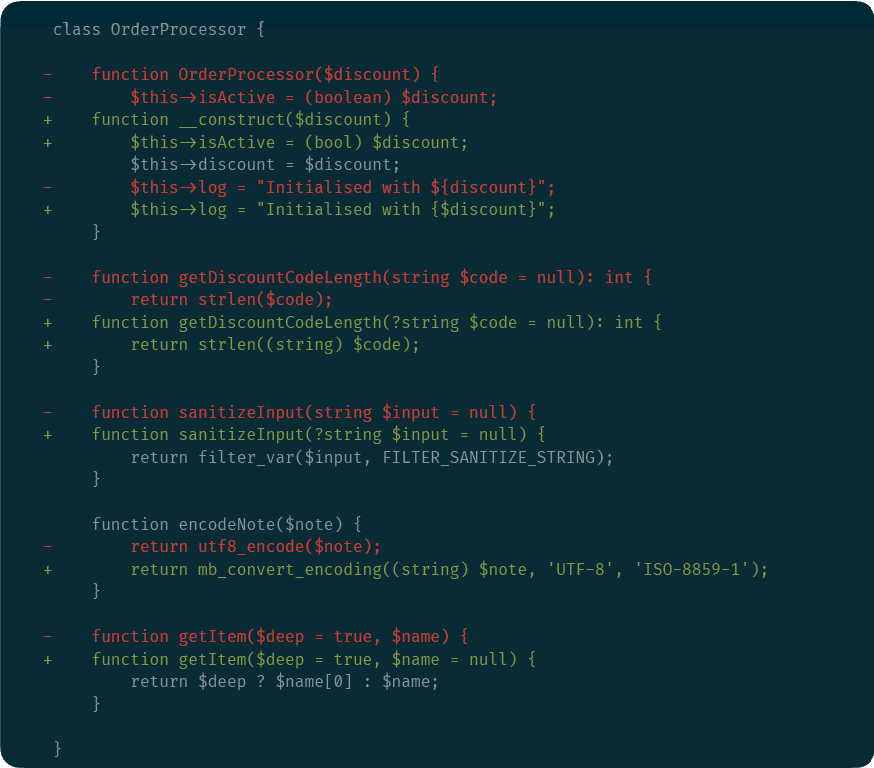
Let’s run Rector on that old legacy code we saw earlier. This is the diff.
What’s changed?
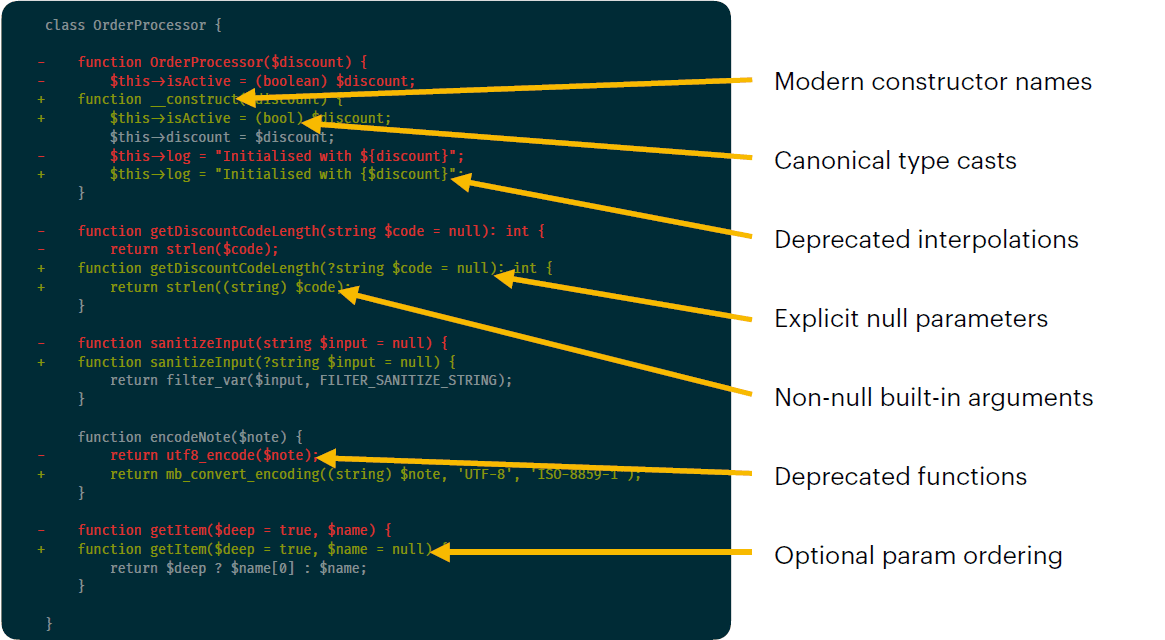
Modern constructor names:
4.x -> Constructor method name equals class name
7.0 -> Uses __construct() now
Canonical type casts:
8.5 -> Non-canonical type casts deprecated
Includes: boolean, double, integer, binary
Deprecated interpolations:
8.2 -> Dollar-brace notation deprecated ${var}
Use brace wrapping notation instead {$var}
Explicit null parameters:
8.4 -> Implicit null params deprecated “string $var = null”
Must have null type declaration now “?string $var = null”
Non-null built-in arguments:
8.1 -> Passing null to non-nullable internal function params deprecated
Now have to add type safety or cast
Deprecated functions:
PHP often deprecates internal functions
8.2 -> Deprecated utf8_encode()
Optional param ordering:
8.0 -> Deprecated optional params being before required params
All params after the first param with a default value must also have default values
Across your whole project simultaneously
Now imagine that across every file in your codebase, in seconds.
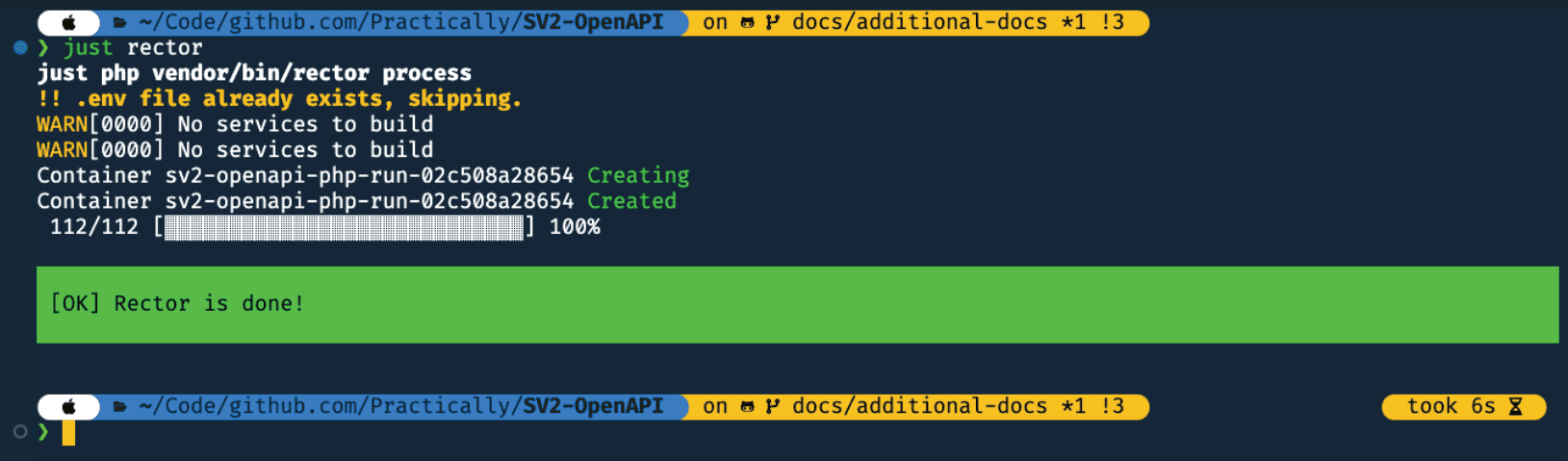
Here’s what it looks like when it’s done.
6 seconds across 112 files, and that includes Just and dealing with Docker containers.
How does it work?
It’s worth exploring how Rector does this - it’s not magic.
1. Parse code into AST
Using nikic/php-parser
- Abstract Syntax Tree
- Structured, hierarchical data representation of your code
- Not the raw text, but the meaning of it
- Function call -> Node with children for arguments
- Class definition -> Node with children for methods,
properties, etc.
Where F&R and Comby/Microplane work on text/pattern matching, Rector works with real context and structure.
Rector understands your code and how it’s written, giving it meaningful ways to apply changes.
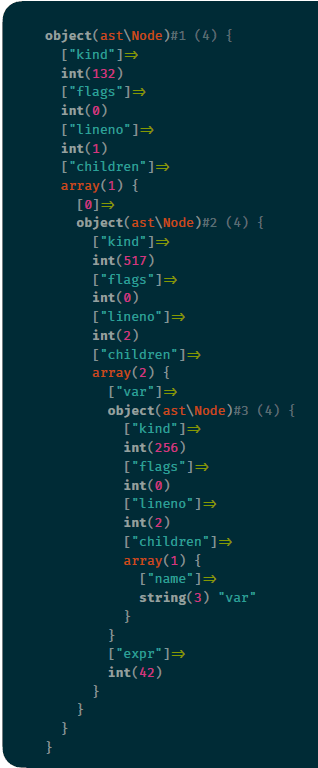
For example, it reads a function call as a node, each argument is a child of that node.
Same with a class definition - it’s a node, and each method and property is a child. Those child nodes will also have children.
Here’s what an AST might look like.
2. Apply rules
- Either individual rules or collections of related rules (“set lists”)
- Each rule is a PHP class
- What nodes is it interested in?
- What to do when it finds one?
- Operates on the AST, not text matching
- Much more reliable than find-and-replace
Next, Rector applies individual or collections of rules to the code.
Each rule is a PHP class so it’s easy to understand, modify/extend, and contribute to.
Works with project-specific context, including code structure, architecture, different naming conventions, etc.
Example: Php4ConstructorRector
- Converts PHP 4 style constructors to __construct
- Find any method whose name matches its containing class name
- Rename it to __construct
Let’s look at an example - the constructor method name refactor we saw earlier.
This one is a nice simple example. Some rules are complicated, and do lots of checks to make sure it matches correctly and the refactors are appropriate (and also
matched to your coding style).
2. Add a config file
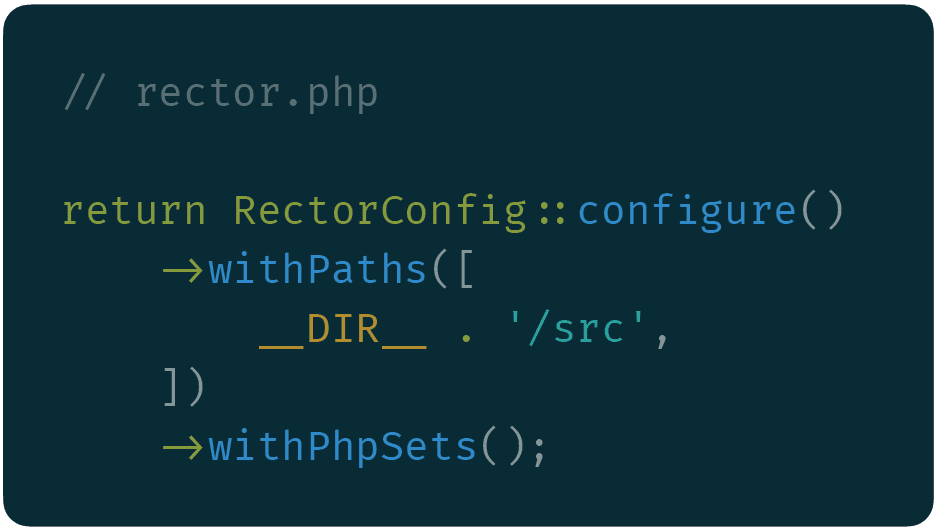
Goes in the project root (or wherever your composer.json is)
3. Modify and print the code
- Modifications made to the AST
- Rector converts the AST back into source code
- Formatting is preserved
- Only changed lines are output -> clean dif
Rector then creates a diff and applies it to the source code. Formatting is preserved!
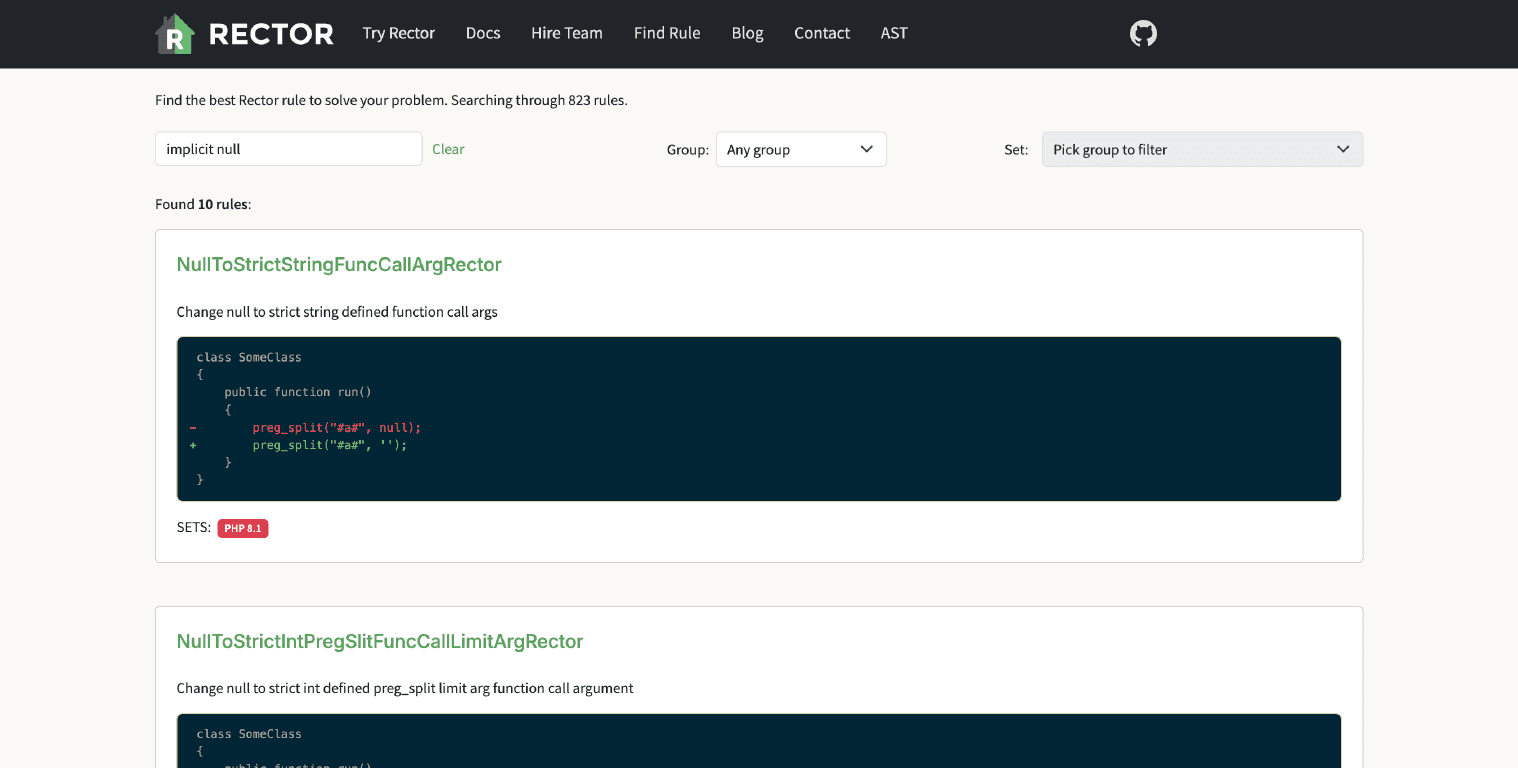
Where do I find rules?
There’s loads of rules to check out, for a wide range of use cases.
What are set lists?
Collections of related rules
Curated and bundled for convenience
Instead of configuring the 19 separate rules to upgrade to PHP 8.5
Just say “make this codebase valid PHP 8.5”
If Rector was a Pirate Metal band touring the UK, its rules would be the songs they perform at a gig, and the set list would be the list of all songs they performed at that gig (y’know, like a real set list).
The set lists are curated by the developers and contributors.
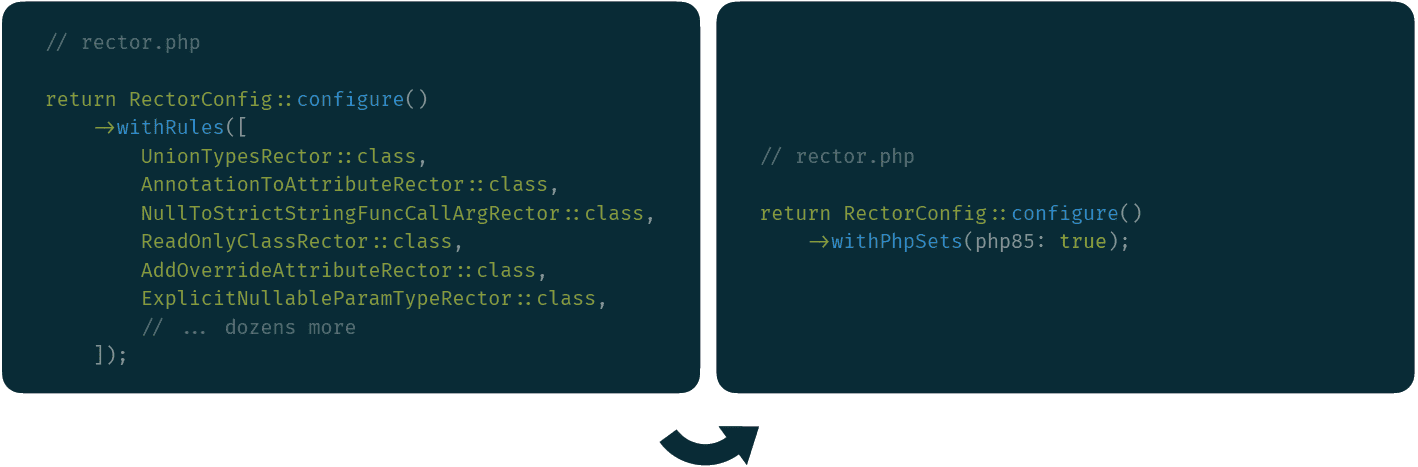
Set lists turn complicated and brittle configs into tidy ones.
Rector can use your Composer PHP version
Better yet: get Rector to figure out your PHP version set list for you!
PHP version set list applied programmatically
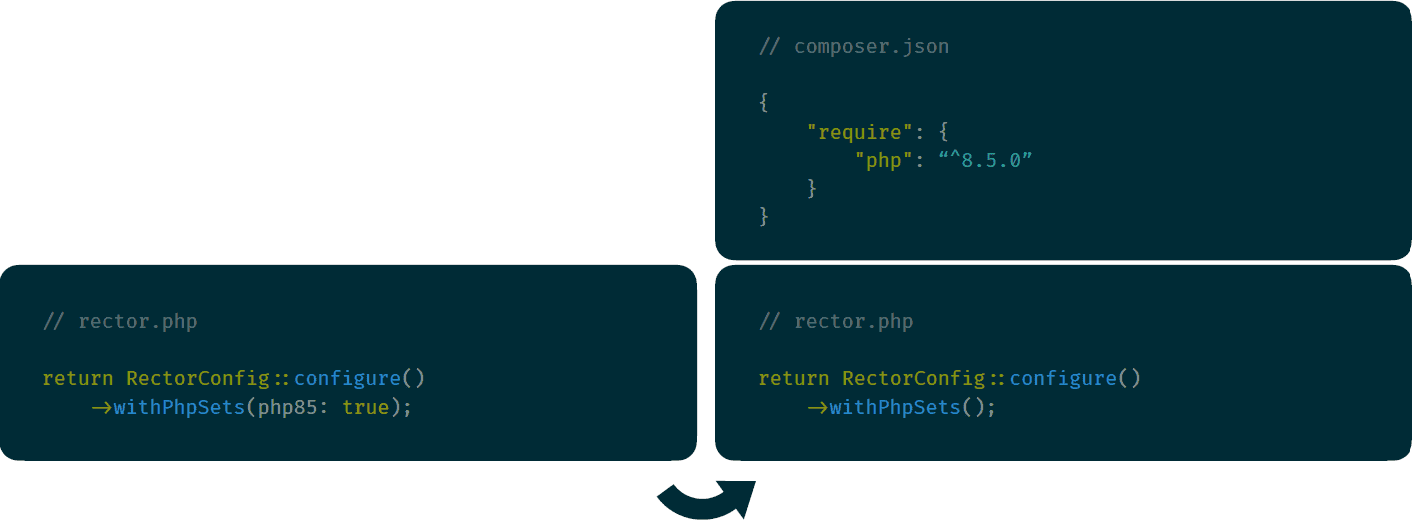
Tell Composer what PHP version your app supports, and Rector can pick that up automatically.
Side note about Composer PHP versions
Rector uses your minimum supported version
Example:
- Composer PHP version constraint: ^8.3
- That means: 8.3.0+ up to the latest 8.x
- Running PHP 8.5? Doesn’t matter.
- Your app still supports PHP 8.3
- Rector can’t fully upgrade to 8.5 without potentially breaking 8.3
- Psalm does this too!
Rector doesn’t use the PHP version that’s running on the environment - it uses the minimum version as defined in composer.json
If your environment is using PHP 8.5, but your composer.json says 8.3 upwards, Rector uses PHP 8.3.
Check your Composer PHP version constraints - what’s the minimum version of PHP that satisfies it? Rector will use that.
PHP version set lists are cumulative
Upgrade multiple PHP versions at the same time
Using the set list for PHP 8.5, but you’re jumping from PHP 7.4? Good news! Rector automatically considers that set list an “up to PHP 8.5”, which includes all the previous rules from 8.0+
It means you can jump multiple versions in one go - but do so with care!
Beyond PHP upgrades
I described Rector as an automated code refactoring tool. That means PHP version upgrades is only one of its use cases.
What else can it do?
Dead Code
Removes code that provably does nothing, e.g.:
- Unused variables
- Unreachable code after a return
- Empty catch blocks
- Redundant conditions
- Conservative by nature
- Only removes things it can be certain about
This is something we likely don’t do enough of!
Do you even know how much dead code your projects contain? Are you maintaining dead code without realising it?
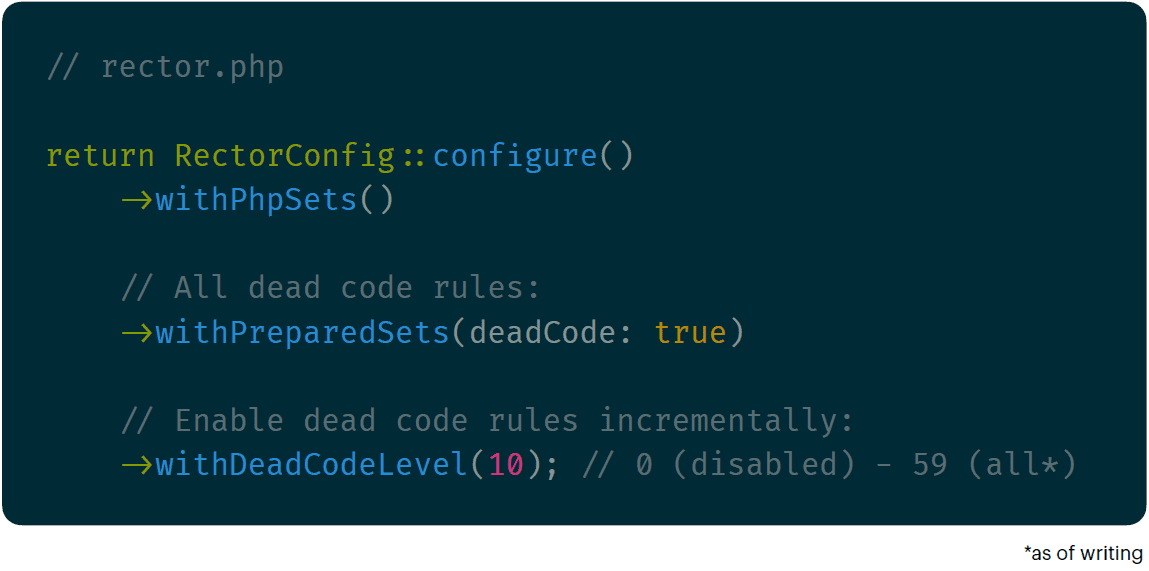
Here’s an example config for dead code.
Why would you use levels instead of everything? It’s much easier to review small isolated and single-purpose changes than to review a whole upgrade at once.
Remember: commits should do one thing and one thing only - that’s the best practice.
Side note about levels:
They’re actually the number of rules in a set
When you hit the maximum level:

Quick side note: the levels actually directly equate to the number of rules in the list. That means by increasing your level by 1, you’re actually telling Rector to run 1 additional rule in that set from now on.
The rules are ordered specifically by the maintainers, from safest to most drastic.
But wait - how do we know what the maximum level is for a set list? Rector actually has a really elegant solution for this.
When you hit/exceed the maximum level, it tells you that you’re ready to graduate to the prepared sets! Since you’re applying all the rules in the set, you can just switch to the full set by default. New rules in that set are automatically applied in future releases.
This is the best solution, because even though you might think “agh! New rules? But I want to control them!”, actually new rules could be added anywhere in the order. So the number becomes detached from what you think it means. In other words, used prepared sets when you hit the maximum.
Code Quality
- Improves readability, maintainability and modern standards adherence
- Simplifying overly verbose expressions
- Collapsing nested ternaries
- Replacing pointless helper variables
- Reduces technical debt
- Implements best practices
Rector also improves your code quality! It’s great for finding out what the best practices are nowadays.
Modern standards adherence - three of the most exciting words I’ll say today
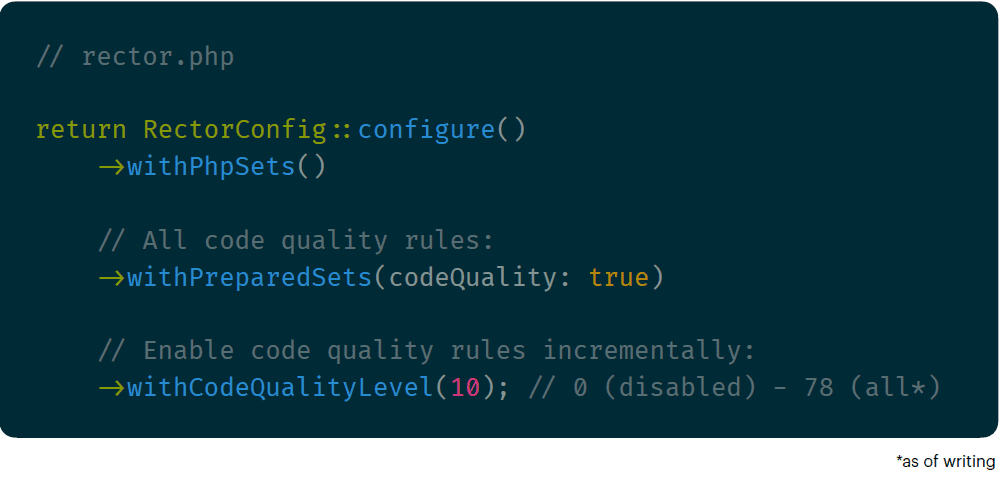
Here’s an example config.
As mentioned: the level equates to the number of rules from the set to run, in order of how safe it is.
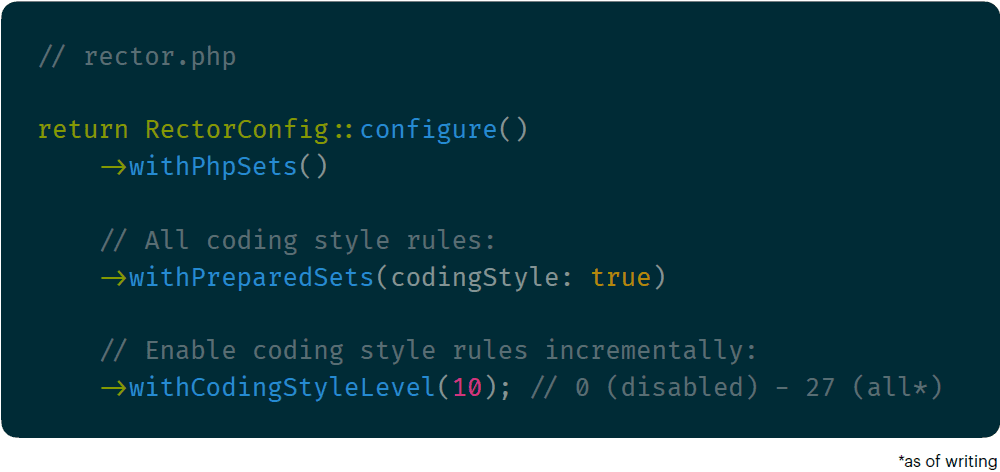
Coding Style
- Semantic code refactoring
- Enforces modern, clean and consistent syntax patterns and structures
- Explicit public class methods
- Strict array searching
- Catch exception name matching
- Goes beyond superficial formatting
What about structural code style? Yep, Rector does that too. It’s a bit like Prettier, but goes deeper.
Example config again.
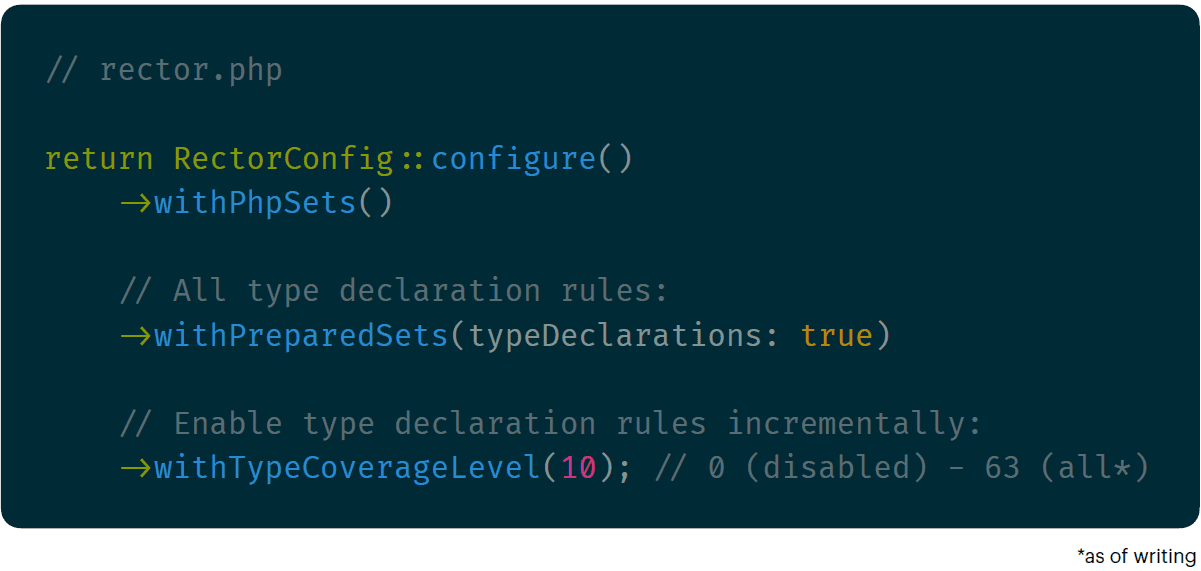
Type Declarations Coverage
- Adds strict, modern type declarations
- Avoids relying on inferred or mixed types
- Reduces technical debt
- Better type handling and safety
And Rector also sorts out your type declarations for you, which is super useful.
Psalm might finally be happy with your codebase?
Example config!
Rector has loads more rules and a few more set lists, which fit even more use cases. You can also add your own - it’s just PHP code!
For now, let’s move on.
Caveats and limitations
Like all software, Rector is best used when its limitations and trade-offs are carefully considered.
Two concerns here
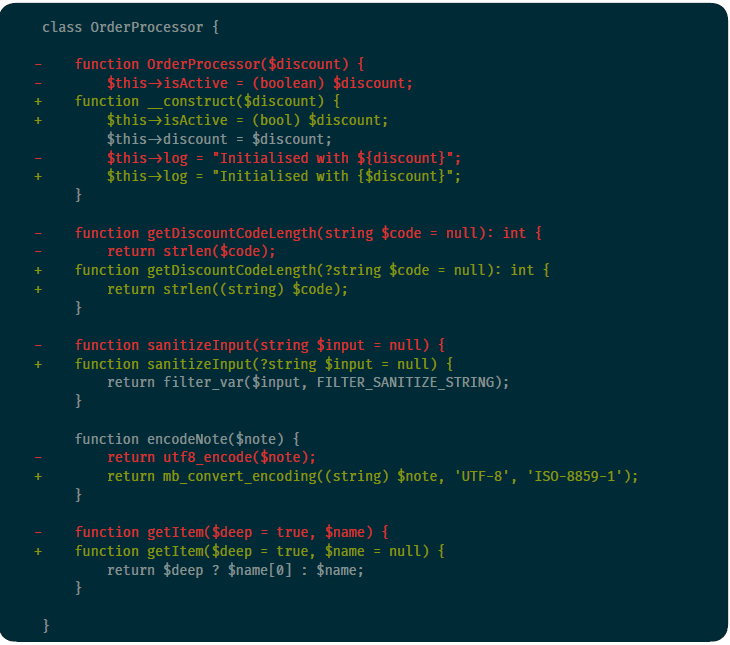
Let’s revisit our diff from before. Notice anything concerning?
I found at least two issues here. What do you think they are?
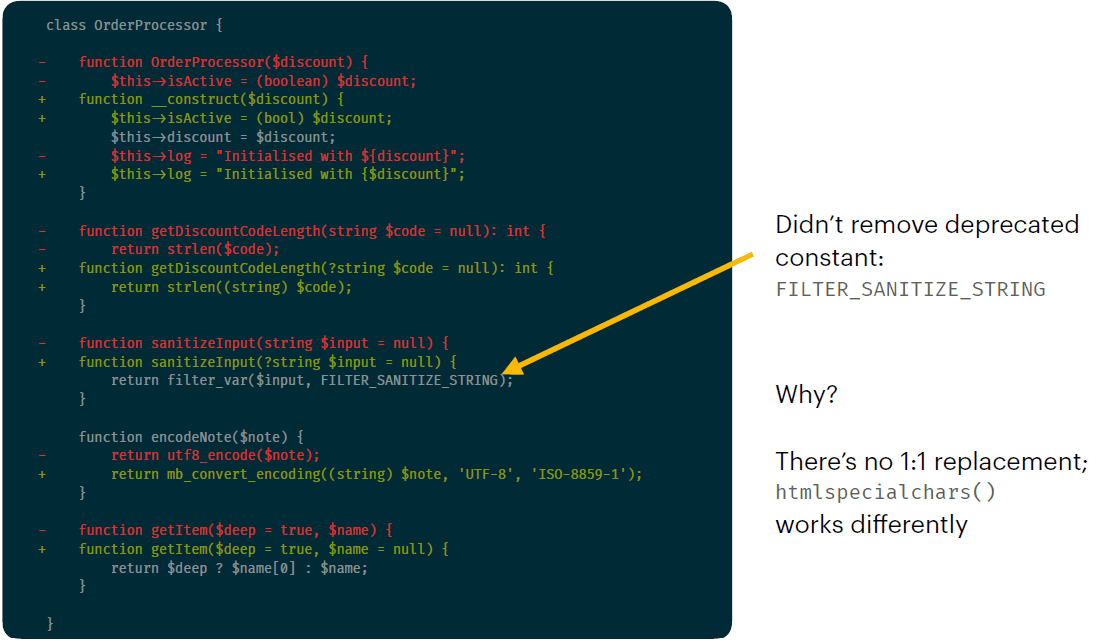
Anyone?
The first concern affects this line. Specifically, “FILTER_SANITIZE_STRING”.
Yep, it’s deprecated as of PHP 8.1. So why didn’t Rector fix it?
It’s because it can’t. There isn’t a direct “lift and shift” replacement. The recommended path is to use htmlspecialchars(), but that works differently to filter_var(). Rector
can’t refactor stuff that has no modern equal.
How do we work around this? It requires knowledge of what’s deprecated, and a developer to refactor it manually. That first bit can be done by Psalm/phpcs - the
second bit is up to us!
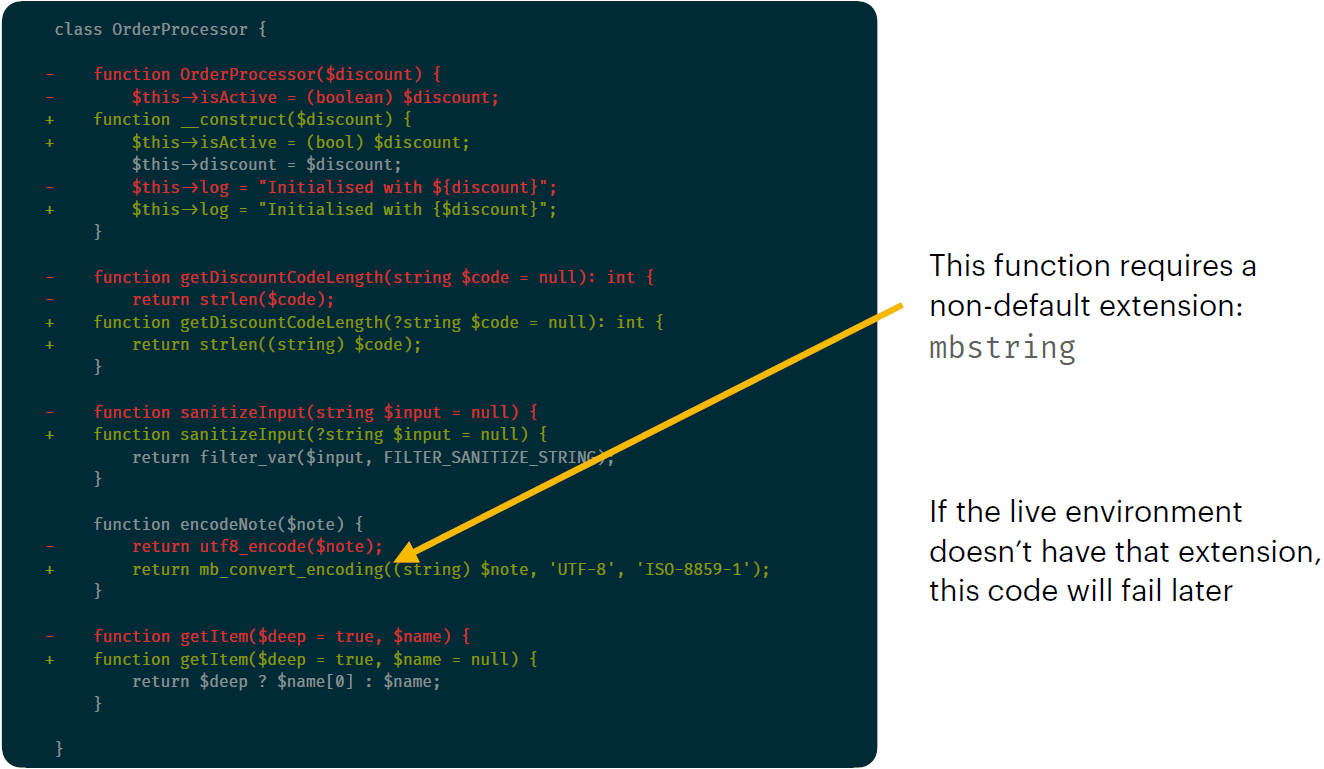
What about the second concern? It affects this line.
uft8_encode() is deprecated. Notice that Rector already fixed that. But what’s wrong with the function is used instead?
Oops - it’s part of a PHP extension “mbstring” - it’s not in core PHP.
What happens if that code is deployed to an environment that doesn’t have that extension loaded? Yep - it breaks. Undefined function.
It’s likely that Rector did this as a result of a pragmatic, real-world decision: in practice, mbstring is enabled on virtually every modern PHP environment. Scenarios in
which it isn’t actually become edge cases.
Theoretical risk = high. Practical risk = low.
Rector didn’t make a wrong substitution here - it made a reasonable assumption that just might not hold in your specific environment.
So, how do we work with this? Make sure all environments (local, CI, stage, live) all use the same PHP version with the same extensions loaded. Keep your environments
consistent, and run your test suite. This is a better engineering principle than anything Rector-specific - we should be doing this anyway… right?
If your environments aren’t consistent, Rector is probably the least of your problems.
What do these caveats tell us?
Rector changes require judgement calls
Judgement calls require developers paying attention
That Rector isn’t a “run it, ship it” kind of tool. But honestly, name a tool you’d just run and ship without thinking. I’d argue that no tool actually fits that description.
That Rector, like other tools, requires developers’ eyes and attention to control and review the output.
Always review changes before committing
Don’t rely on Rector or Copilot to get it right without human review
As always: review changes before committing. Every developer should have this internalised, regardless of where the changes come from - Rector, Copilot, yourself, anywhere!
Rector does its best to make good, accurate refactors. It fails sometimes.
Copilot does its best to build context and spot issues before merging. It fails sometimes.
Only we humans have the full context and judgement to review changes properly. Sure, even we fail sometimes. But we have accountability - tools can’t be held responsible for a bad deployment. A human signed off on it.
Rector is one part of your pipeline
1. Rector
Automated refactoring and deprecation fixes
2. PHPStan/Psalm
Catches type errors, undefined behaviours
3. PHP-CS-Fixer/phpcs
Ensures consistent coding standards
4. Your test suite
Confirms behaviour hasn’t changed
5. Human review
Catches environmental assumptions, architectural decisions, missing context
6. AI review
Increasingly useful extra pass for spotting subtle issues at scale
Rector is best used as part of a balanced pipeline!
But if there’s anything you take away from this presentation today, I want it to be this:
Go into it dry.

That is, have Rector do a dry run before letting it loose on your codebase.
Dry runs also let us use Rector for something else:
Suggestion: Rector as a linter
Similar to Prettier
Linting!
Want to use Rector like Prettier and block PRs that haven’t been “rectored”? You got it.
The main benefit here is that you don’t need to remember to use Rector - because you have to. It’ll tell you!
Run Rector (dry run) in CI
Use as a gate to block PR merges if the changes aren’t clean
Got changes? You forgot to run Rector!
Similar to how we use Prettier
Now, let’s do some questions…
What’s the oldest PHP version used on a project right now?
How long would it take you to find out? Think of all the servers to check.
How long would it take you to refactor it to work with PHP 8.5?
Remember that legacy codebases running on ooooold versions of PHP tend to be the least architecturally sound.
What’s deprecated between PHP 7.4 and 8.5?
Or between any other version range, for that matter? How long would it take you to collate that info?
I think you get the point here. But, let’s bring back that pressure from before:
What critical security vulnerabilities exist for PHP right now?
Any ideas?
Which vulnerabilities affect our projects?
In fact, how do you know that someone isn’t exploiting them right now?